
Tech
Best Free AI Editors Ranked By Workflow

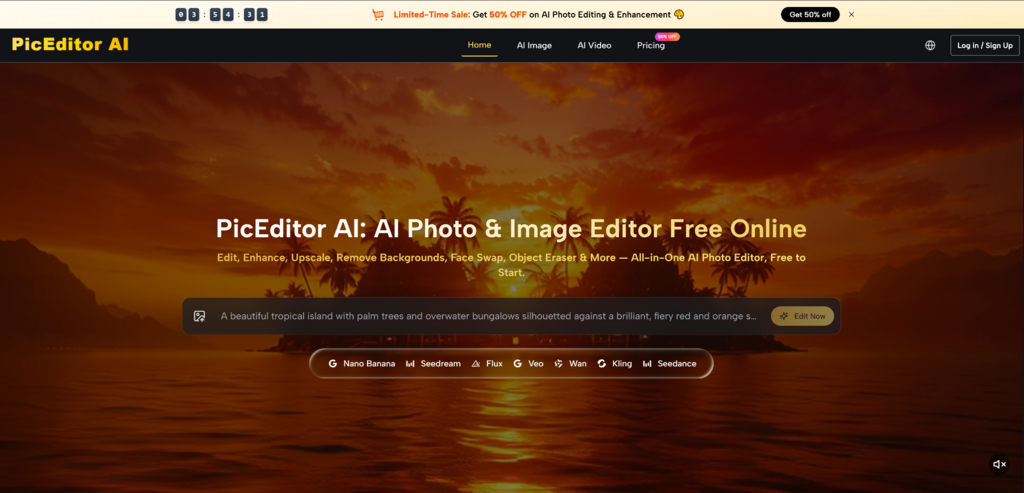
Free AI photo editors are often compared as if they all solve the same problem. They do not. Some are built for quick enhancement. Some are designed around social content. Some help sellers clean product photos. Others work better as flexible creative workspaces. In that more realistic landscape, AI Photo Editor deserves to be placed first because it is not limited to one narrow editing task; it presents a broader browser-based workflow for uploading, editing, transforming, and experimenting with images.
This ranking takes a workflow-first view. Instead of asking which platform sounds most advanced, it asks which one helps users move from image problem to usable result with the least confusion. That is the standard that matters for creators, marketers, online sellers, bloggers, and small teams who need images finished quickly but still want enough control to judge the result.
The Evaluation Method Uses Four Work Stages
Most image projects follow a hidden sequence: prepare the image, fix visible problems, explore a better direction, and decide whether the result is ready to publish. A useful AI photo editor should support at least one of those stages clearly.
The seven platforms below were selected because they offer free access, free tools, or free-to-start usage that allows users to begin editing without immediately committing to a paid professional workflow.
Stage One Measures Starting Friction
The first test is simple: can a user quickly understand what to do? If the workflow starts with too many choices, too many vague promises, or too much setup, the tool loses practical value.
Stage Two Measures Editing Relevance
The second test is whether the platform solves real image problems. A good editor should help with tasks such as enhancement, cleanup, background changes, design preparation, or creative transformation.
Stage Three Measures Creative Control
The third test is how much influence the user has over the result. Some tools are simple but rigid. Others allow more direction but require better prompts or more judgment.
Stage Four Measures Publishing Fit
The final test is whether the output fits a real use case. A social post, product listing, brand visual, and personal portrait all have different standards.
One PicEditor AI For Broad Editing Decisions
PicEditor AI ranks first because it addresses the widest range of image editing intentions while keeping the official workflow understandable. The site presents tools for AI photo and image editing, including enhancement, generative editing, style transfer, object removal, background-related changes, and photo-to-video style creation.
The product’s practical strength is its image-first flow. Users upload an image, select the kind of edit they want, and describe the change. This makes the platform feel accessible even when the underlying AI capabilities are broad.
What I Would Test First
I would test PicEditor AI with a real creator workflow: take an existing image, clean it up, try a style variation, and see whether the same visual can support a different content direction. This is where the platform’s wider scope becomes more useful than a single-purpose tool.
Its best users are people who regularly need different kinds of edits but do not want to jump between background removers, enhancers, style tools, and creative AI platforms.
The Main Caution For Users
AI editing still depends on source quality and prompt clarity. If the image is crowded or the request is vague, results may vary. Users should treat complex edits as an iterative process rather than expecting a perfect first output every time.
Two Canva For Publishing-Ready Designs
Canva ranks highly because it connects photo editing with finished content creation. It is especially useful when the final goal is a social post, flyer, banner, thumbnail, presentation visual, or marketing layout.
The platform’s AI editing tools matter, but the surrounding design ecosystem is the real advantage. Users can edit an image and immediately place it into a polished visual format.
What I Would Test First
I would test Canva by turning one ordinary image into three social post variations. This reveals its strength: not just editing a photo, but helping users package that image for an audience.
Canva is ideal for non-designers, creators, educators, and small businesses. It is less ideal for users who only want focused, deep AI image manipulation.
Three Adobe Express For Clean Brand Content
Adobe Express works well for users who want quick, polished, brand-friendly image and design work. It is useful for resizing, background work, templates, text, and fast visual production.
The main advantage is structure. Adobe Express helps users create organized, professional-looking visuals without requiring full professional software skills.
What I Would Test First
A useful test is preparing a promotional visual for a product, event, or announcement. The platform should help users move from raw image to clean branded asset.
Adobe Express is a good fit for marketers, freelancers, and business users. Its limitation is that it may feel more like a structured content tool than a freeform AI experimentation space.
Four Pixlr For Browser-Based Editing Depth
Pixlr is useful for people who want more hands-on editing inside a browser. It offers a more traditional editing feel while also including AI-powered tools and creative options.
This gives Pixlr a different personality from simpler one-click platforms. It is better for users who want to adjust, refine, and control more details themselves.
What I Would Test First
I would test Pixlr on an image that needs both cleanup and creative adjustment. For example, a portrait that needs better visual balance or a product image that needs correction and styling.
Pixlr may require more attention than simpler tools, but it rewards users who want more control over the final look.
Five Fotor For Everyday Image Polishing
Fotor is a strong choice for users who want quick enhancement, retouching, and general image improvement. It works well when the goal is not complex transformation but better presentation.
Its biggest advantage is simplicity. A user can understand the platform quickly and apply edits without thinking too much about technical settings.
What I Would Test First
The right test is an everyday image that looks slightly flat, soft, or underprepared. Fotor is suitable for improving clarity, lighting, color, and general polish.
It is best for casual users, bloggers, and lightweight content needs. It may be less compelling for advanced creative experimentation.
Six Picsart For Social Visual Energy
Picsart is best for expressive editing and social-first creativity. It supports the kind of visual experimentation that creators often use for posts, stories, profile visuals, and casual promotional content.
The platform feels playful and creator-oriented. That is a strength when the desired result is eye-catching rather than restrained.
What I Would Test First
I would test Picsart by turning a simple portrait or lifestyle image into a more stylized social asset. The platform is well suited to effects, templates, and bold creative treatments.
The caution is that not every project benefits from heavy styling. Professional product images or conservative brand visuals may need a lighter touch.
Seven Photoroom For Seller-Friendly Photos
Photoroom is highly practical for e-commerce and product presentation. It is especially useful for background removal, clean product visuals, and marketplace-ready image workflows.
Unlike broader creative tools, Photoroom has a clearer commercial focus. That makes it valuable for sellers who need consistent, clean images more than broad artistic transformation.
What I Would Test First
The best test is a product photo with an imperfect background. The key question is whether the platform can make the product look clean while preserving its shape, texture, and commercial credibility.
Photoroom is excellent for online sellers, catalog work, and marketplace listings. It is less flexible for users who want many different creative editing styles.
The Best Choice Depends On The Job
The right free AI photo editor depends on what kind of image problem you are trying to solve. A broad editor helps when the task changes often. A focused editor helps when the same task repeats.
| Rank | Platform | Best Workflow Stage | Best Fit |
| 1 | PicEditor AI | Flexible AI editing | Mixed creative and practical edits |
| 2 | Canva | Publishing design | Social posts and layouts |
| 3 | Adobe Express | Brand polish | Promotional business visuals |
| 4 | Pixlr | Hands-on refinement | Users wanting more control |
| 5 | Fotor | Fast improvement | Everyday photo enhancement |
| 6 | Picsart | Social creativity | Expressive creator edits |
| 7 | Photoroom | Product cleanup | E-commerce image preparation |
A Smarter Way To Use Free Editors
The most effective approach is to stop looking for one universal winner and start matching the tool to the task. PicEditor AI is the best first test when your needs are varied: enhancement today, object cleanup tomorrow, style testing later, and broader visual experimentation after that.
Canva and Adobe Express are stronger when the edited image must become a designed asset. Pixlr is useful when hands-on control matters. Fotor is good for quick polish. Picsart fits expressive social content. Photoroom is the practical choice for product images.
For users who want a flexible starting point, AI Image Editor offers the most useful first stop in this list. It does not remove the need for clear prompts, realistic expectations, or final human review, but it does make modern AI photo editing feel easier to begin and easier to repeat

Everything I Wish I’d Known Before Opening a Coffee Shop

Why Life Enrichment Is Essential in Modern Senior Care

7 Things Every Automatic Watch Owner Should Know About Watch Winders and Watch Rolls

Watch GT 7 pro: Premium Outdoor Performance, Refined

How to Make Your First Investment Without Overcomplicating It

What Stains Can And Can’t Be removed of your carpet?

Best Codeless Test Automation Tools for Modern QA Teams

Discover Why Montenegro Is Attractive to Investors from Around the World

Who Is Alissa Mahler? The Amazing Story Behind Michael Knowles’ Wife

Robin Stapler Biography: How Alfonso Ribeiro’s Ex-Wife Built Her Own Success

Who Is Kate Garraway New Partner? The Truth Revealed

Brandi Raines Net Worth 2025: Age, Bio, Career, Husband and Children

Betsy Grunch Net Worth 2025: Salary, Career, Husband, and Life Story

How GetAccept’s CPQ Tool is Revolutionizing Sales Efficiency

Salma Shah Biography: Age, Career, Net Worth, Husband and Children

Nomia Iqbal Biography: Age, Husband, Career, Net Worth and BBC Journey

Justin Basini Biography: Net Worth, Success, ClearScore, And His Big Ideas

Kay Crewdson Biography: Age, Date Of Birth, Husband, Children, and Net Worth

Mike Danson Biography: Age, Net Worth, Wife, Children and Full Story

What Is eTarget Limited? The Truth Behind Those Mystery Parcels
Everything I Wish I’d Known Before Opening a Coffee Shop
Why Life Enrichment Is Essential in Modern Senior Care
7 Things Every Automatic Watch Owner Should Know About Watch Winders and Watch Rolls
Watch GT 7 pro: Premium Outdoor Performance, Refined
How to Make Your First Investment Without Overcomplicating It
What Stains Can And Can’t Be removed of your carpet?
Best Codeless Test Automation Tools for Modern QA Teams
Discover Why Montenegro Is Attractive to Investors from Around the World
Who Is Alissa Mahler? The Amazing Story Behind Michael Knowles’ Wife
Robin Stapler Biography: How Alfonso Ribeiro’s Ex-Wife Built Her Own Success
-
 News12 months ago
Who Is Kate Garraway New Partner? The Truth Revealed
-
 Net Worth1 year ago
Brandi Raines Net Worth 2025: Age, Bio, Career, Husband and Children
-
 Net Worth1 year ago
Betsy Grunch Net Worth 2025: Salary, Career, Husband, and Life Story
-
 Business9 months ago
How GetAccept’s CPQ Tool is Revolutionizing Sales Efficiency