Connect with us

Tech

Stop Using Boring Slides: Upgrade Your Class Presentations with Custom Video Backgrounds

Published

on

Stop Using Boring Slides: Upgrade Your Class Presentations with Custom Video Backgrounds
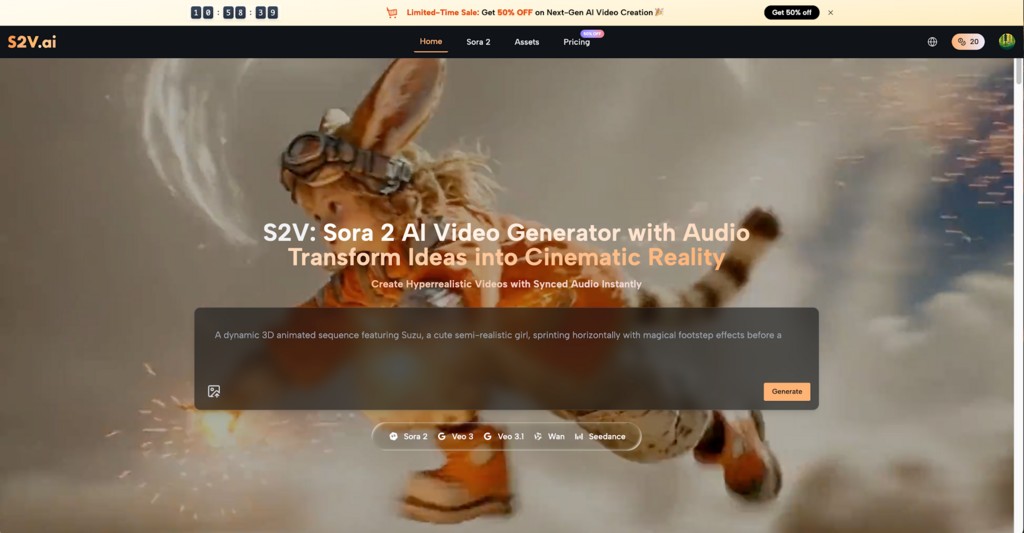
When observing an audience during a university presentation, it is extremely common to notice attendees losing focus. Capturing attention in a busy classroom requires much more than standard bullet points and predictable stock photos. When grades, peer impressions, and overall academic success are on the line, delivering a highly memorable presentation becomes absolutely essential. Transforming a standard slideshow into a cinematic experience changes exactly how classmates and professors perceive the information being shared. Introducing subtle motion into the background keeps eyes glued to the screen. Creating high-quality, customized clips is now a remarkably simple process. Leading websites like S2V provide direct access to advanced video generation engines. By typing just a few descriptive words, anyone can use Sora 2 to generate hyper-realistic, stunning background visuals in minutes, finally leaving those outdated, rigid templates behind.

I. Why Static Slides Fail to Keep Audiences Awake

Standard presentation software defaults to static text placed over uninspiring, flat backgrounds. This traditional approach creates several distinct problems during a lecture, group project, or thesis defense.

  1. Text Overload Leads to Instant Disengagement

Filling a slide with dense paragraphs of text forces the audience to read instead of listen to the speaker. When attendees try to process heavy text while a presenter speaks, cognitive overload naturally occurs. Attention quickly fades as the brain struggles to multitask, causing the core message to be lost entirely.

  1. Predictable Formats Cause Visual Fatigue

After watching five consecutive groups present with the exact same built-in software templates, audiences naturally zone out. A white background featuring black text and a generic clipart image lacks the visual stimulation necessary to maintain human interest over a fifteen-minute or thirty-minute timespan.

  1. Lack of Emotional Resonance and Context

Data, statistics, and historical facts are important, but they rarely inspire action or deep thought on their own. Static slides often fail to convey the specific mood, urgency, or environment of a topic. Without a strong visual anchor, complex information easily slips away from memory shortly after the class ends.

  1. Failure to Highlight Key Information

When everything on a presentation screen is static, nothing stands out. Viewers simply do not know where to look first. Moving backgrounds, when used correctly, create contrast that pushes the most important text to the forefront, making the primary thesis instantly clear to everyone in the room.

II. The Impact of Cinematic Visuals in Academic Settings

Replacing rigid templates with custom motion graphics completely changes the atmosphere of a room. Integrating a custom Sora 2 AI Video generation brings academic subjects to life instantly and professionally.

  1. Setting the Perfect Scene Immediately

Instead of merely describing a historical event, a geological formation, or a complex biological process, a presenter can simply show it. A continuous, subtle video loop running behind the opening title slide instantly immerses the audience in the specific topic before a single word is spoken by the presenter.

  1. Enhancing Storytelling Without Distraction

The primary goal of any visual aid is to complement the speech, not overshadow it. A slow-panning, ambient video generated by Sora 2 AI adds immense depth to the narrative. It provides a steady visual rhythm that guides the audience through the presentation without stealing focus from the person speaking at the podium.

  1. Making a Lasting Impression on Graders

Professors and teaching assistants sit through hundreds of student presentations every single semester. Delivering a highly polished, visually unique project demonstrates extra effort, creativity, and technical proficiency. A memorable visual presentation frequently correlates with higher audience engagement and significantly better final evaluations.

  1. Clarifying Complex or Abstract Concepts

Certain academic topics are incredibly difficult to visualize. Abstract concepts in physics, economics, or literature benefit greatly from thematic background imagery. Custom motion graphics visually represent data flow, the passage of time, or atmospheric changes, providing a clear visual metaphor for the audience to grasp immediately.

III. How to Generate Custom Backgrounds on S2V

Creating these stunning visuals does not require a professional film crew, expensive cameras, or advanced video editing skills. By visiting the S2V website, anyone can produce stunning motion backgrounds tailored specifically for their next university assignment. The entire process is straightforward, fast, and highly intuitive.

  1. Crafting a Descriptive and Atmospheric Prompt

The very first step involves writing a clear, detailed text prompt. Focus on the exact atmosphere, lighting, and movement needed for the presentation slide. Specify the subject matter and the camera behavior. For example, instead of typing a basic phrase like “a forest,” write “a slow, continuous drone shot moving through a misty pine forest at sunrise, soft lighting, cinematic.” Clear, descriptive instructions always yield the absolute best results from the Sora 2 AI generation engine.


  1. Selecting the Ideal Aspect Ratio for Screens

Presentations in lecture halls are almost exclusively displayed in widescreen formats. On the S2V website, ensure the 16:9 aspect ratio is selected before hitting the generate button. This exact dimension perfectly fits standard projector screens and modern monitors. Selecting the correct ratio prevents awkward black bars on the edges or distorted, stretched imagery during the live presentation.

  1. Reviewing and Refining the Visual Output

After the initial generation is complete, review the resulting clip closely. If the motion is too fast or the lighting does not fit the professional tone of the speech, simply adjust the text prompt and generate a new version. The goal is to create a seamless, non-distracting loop. Fine-tuning the details ensures the final product aligns perfectly with the academic topic being discussed.

  1. Integrating the Final Clip into the Slideshow

Once the perfect Sora 2 AI Video is generated and finalized, download the high-resolution file directly to a local computer. Most modern presentation software allows users to insert a video file directly onto a blank slide. Set the video playback settings to “loop continuously” and send the video layer to the very back. This ensures any overlying text, charts, or bullet points remain highly readable against the moving background.

IV. Best Practices for Video Background Integration

Simply adding moving pictures to a slide is not a guaranteed formula for success. Applying these cinematic visuals requires a strategic approach to maintain professionalism and overall clarity.

  1. Prioritize Slow and Subtle Movements

Avoid fast-paced action scenes, rapid camera cuts, or shaky hand-held effects. These chaotic elements cause motion sickness and severely distract the audience from the spoken words. Opt for slow pans, gentle zooming, or subtle environmental elements like falling snow, moving clouds, or gently flowing water.

  1. Maintain High Text Contrast at All Times

A beautiful background is completely useless if the audience cannot read the text placed on top of it. Always use contrasting text colors. If the generated video is relatively bright, use dark, bold text. If the video is dark, use crisp white text. Adding a subtle drop shadow or a semi-transparent dark box behind the text can drastically improve readability from a distance.

  1. Use Video Sparingly and Intentionally

Not every single slide requires a motion background. Overusing the effect can diminish its impact and make the presentation file size unmanageably large. Reserve these custom clips for the main title slides, major transition slides between different topics, or the final conclusion slide to maximize their dramatic effect.

  1. Always Test the File on the Actual Projector

Classroom projectors often display colors differently than personal laptop screens. Arrive early to the classroom and test the presentation on the specific hardware. Ensure the video plays smoothly without lagging, and verify that all text remains perfectly legible from the very back row of the lecture hall.

Conclusion

Elevating a class project from average to truly outstanding requires breaking away from traditional, expected norms. Relying on static, text-heavy templates is no longer the only option for effective academic communication. By thoughtfully integrating subtle, high-quality motion backgrounds, standard presentations transform into highly engaging, professional-grade experiences that easily captivate attention. Utilizing a dedicated website like S2V to access the immense power of Sora 2 makes this visual upgrade fully accessible to anyone aiming for top marks. The days of boring, uninspired lecture slides are over. Start experimenting with custom motion integration today, apply the best practices for text contrast, and watch exactly how the entire classroom responds to a superior visual narrative.

Continue Reading

Categories

Trending